

SAFETY IN MOTION
Digital Hall Passes for Student Activity Scheduling
Coordinating campus activities can be a logistical headache. Flex drives visibility, engagement and accountability across all student activities before, during, and after the school day.
Structured Flexibility With Full Visibility
Flex organizes unstructured time by managing schedules, sign-ups, and attendance in one place, giving schools real-time visibility into where students are while still supporting choice and enrichment.
Access to Intervention and Enrichment
Data-driven activity management ensures students receive the right support at the right time, connecting struggling students to intervention while expanding enrichment opportunities for others.
Efficient Activity Management for Staff
Centralized tools for creating activities, tracking attendance, and monitoring participation reduce administrative workload and help educators focus more time on students, not logistics.
Testimonials
Schools Like Yours Are Already
Seeing the Difference
“Flex is a data driven tool that has opened up the possibilities for our students to enhance their school life with us. We’ve seen grades go up, failure rates go down, and student engagement increase—all because of how we’re using Flex.”
Angela BaslerWest Clermont School District, OH
"Flex has allowed us to track where students are, ensure safety, and avoid classroom overloads—all while offering meaningful, student-driven learning opportunities."
TJ RizzoNorth Attleboro High School, MA
"Participation has gone up. Students feel more connected. Teachers are on board, encouraging students to get involved and check in."
Sarah AndersonMarinette School District, WI
Product features
SmartPass Flex
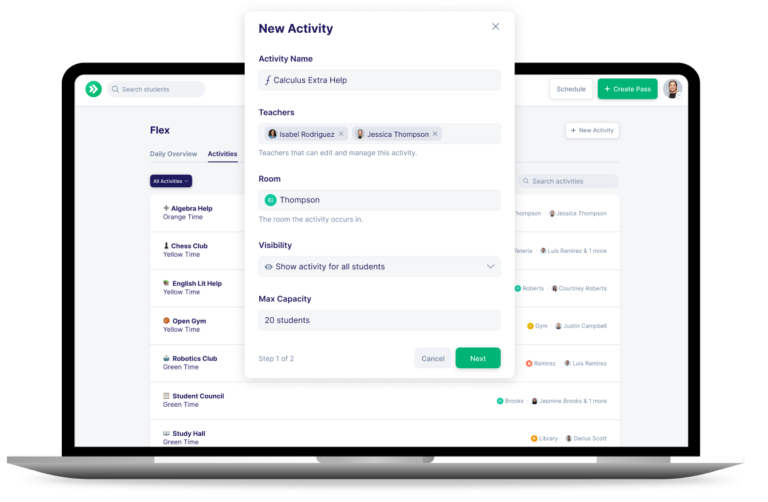
Flex Period Scheduling & Sign-Up Windows
Administrators define flex periods and control student sign-up windows, creating structured flexibility that keeps student movement organized and predictable.
Teacher-Created Activities
Teachers create and manage unlimited activities for intervention, enrichment, clubs, and events, with support for multiple facilitators and no limit on the number of activities offered.
Custom-Scheduled Activities
Activities that fall outside of flex blocks, like makeup exams or performances, can be scheduled once and set to recur as needed without extra setup.
Real-Time Student Snapshot
Staff can instantly see a student’s current location, upcoming activities, and participation history to support accountability, safety, and informed intervention.
Attendance Tracking & SIS Export
Attendance can be taken and edited directly within activities, then exported to the SIS to maintain accurate records of where students spend their time.
Daily Overview Dashboard
Administrators get a real-time view of all activities, student sign-ups, and open spots for the day, reducing logistical stress and improving campus-wide coordination.
Ready to See SmartPass Flex in Action?
Discover More About SmartPass Flex

FAQs About SmartPass Flex
SmartPass Flex FAQs
SmartPass focuses on managing everyday student movement, like restroom visits or trips to the nurse, by replacing traditional hall passes with a digital system.
SmartPass Flex is designed for structured, flexible periods such as advisory, enrichment, or intervention blocks. It helps schools schedule activities, assign students, and manage where they should be during those dedicated times.
Flexible periods can quickly become unstructured without clear systems in place. Software helps schools organize activities, assign students, manage capacity, and track attendance in real time. This creates a more intentional experience for students while giving staff visibility and control.
No. Flex is designed to manage scheduled activities during flexible periods, not everyday hallway movement. Schools often use both SmartPass and Flex together, with SmartPass handling day to day passes and Flex managing structured activity time.
SmartPass Flex gives students access to structured choices during flexible periods, whether that is academic support, enrichment, or independent work. It ensures students are placed where they need to be while still allowing for flexibility, helping create a more engaging and personalized school day.
SmartPass Flex does not track a student’s physical location. It shows the activity a student is assigned to and where they are expected to be during that period. This provides visibility for staff without using real time location tracking.
No. Students can access Flex on school provided devices such as Chromebooks or classroom computers. Schools can choose to allow mobile access, but it is not required for participation.